Rendered Fits · Guide
AI vs AR virtual try-on: which works for clothing?
AR try-on overlays a 3D model of a product on a live camera feed; AI try-on generates a still image of the shopper wearing the product from a photo they add. AR works best for small, rigid items such as glasses and jewellery. AI works best for clothing, because fabric has to drape on a real body.
Below: how each one works, a side-by-side comparison, which to use for each product type, and what neither can tell a shopper. Rendered Fits makes an AI try-on app for Shopify fashion brands, so weigh our view accordingly.
By the Rendered Fits team · Reviewed 20 October 2026
How AR try-on works
AR (augmented reality) try-on opens the shopper's camera and tracks their face, hand or foot in real time. A 3D model of the product is placed on that tracked point and redrawn every frame, so it moves as they move. The shopper sees themselves in a live mirror with, say, a pair of glasses on.
- Needs: a 3D model of each product, camera permission, and a device fast enough to track and render live.
- Strong at: rigid objects on predictable anchor points (eyes, ears, wrist, fingers, feet) and seeing them from every angle.
- Weak at: anything soft. Fabric bends, folds and hangs differently on every body and pose, and a live overlay has to fake that dozens of times a second.
How AI try-on works
AI try-on starts from a photo of the shopper and the brand's ordinary product photos. An image model, usually a diffusion model, reads the garment's shape, colour and details, finds the shopper's pose, and draws the garment onto them with folds and shadows while keeping their face. The result is a still image, typically ready in seconds.
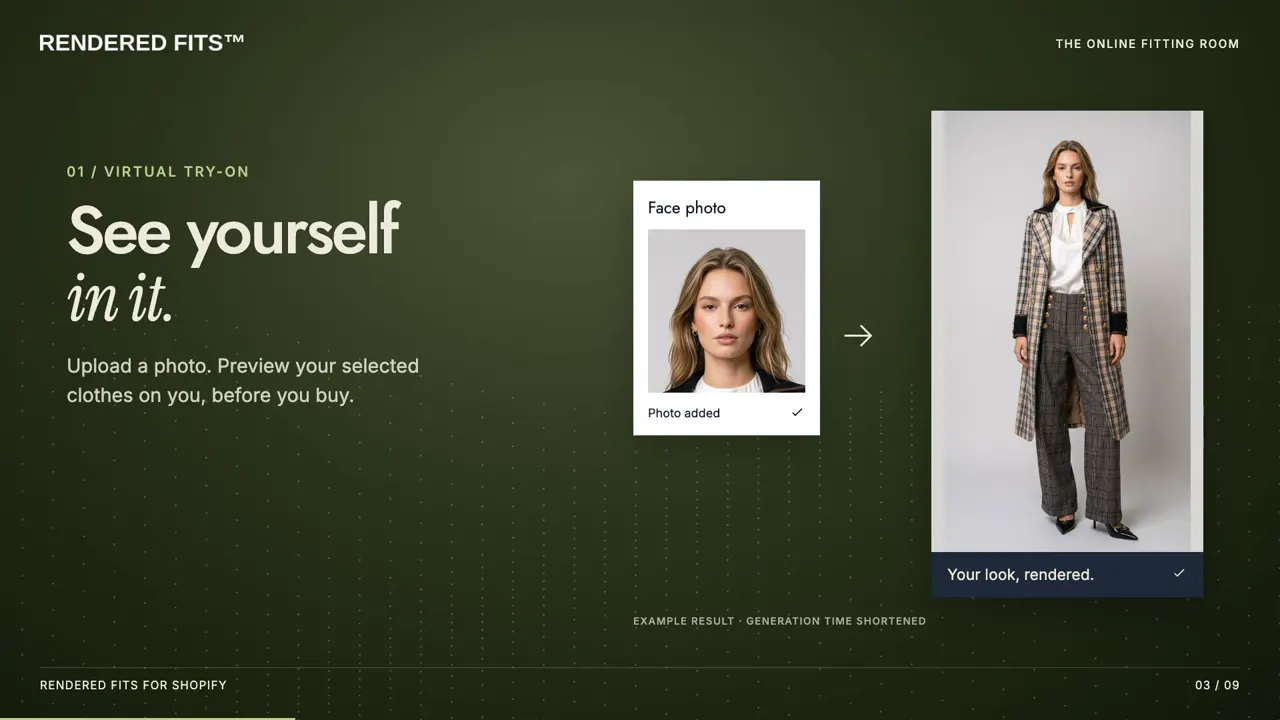
- Needs: a shopper photo and existing product photography. No 3D files.
- Strong at: clothing and full outfits, where drape, length and proportion decide the purchase.
- Weak at: real-time movement, and very fine detail such as small logos or intricate prints, which can drift. It is a preview, not a measurement.
Search and shopping platforms have moved the same way: Google Shopping (in the US) and, since 1 October 2026, ChatGPT both offer clothing try-on from a shopper's photo rather than a live camera.
AI vs AR side by side
| AR try-on | AI try-on | |
|---|---|---|
| Shopper gives | Live camera access | One photo |
| Shopper sees | A live, moving overlay | A realistic still image |
| Brand needs | A 3D model per product | Existing product photos |
| Fabric and drape | Hard to show convincingly | Generated with folds and shadows |
| Angles | Every angle, in real time | Front view; some apps add side and back |
| Speed | Instant once loaded | Usually a few seconds per image |
| Works on | Mostly phones with a good camera | Any device that can upload a photo |
| Shareable result | Needs a screenshot | An image the shopper can save |
| Shows fit or size | No | No; pair with size advice |
Which to use for each product type
| Product | Better fit | Why |
|---|---|---|
| Dresses, coats, knitwear, tailoring | AI | Drape, length and silhouette matter most. |
| Full outfits | AI | Several garments have to layer correctly on one body. |
| Swimwear and lingerie | AI, with care | Works on photos, but check privacy notices and test outputs closely. |
| Glasses and sunglasses | AR | Rigid, sits on a predictable point, and shoppers want to turn their head. |
| Make-up | AR | Colour on a moving face in real light. |
| Jewellery and watches | AR, or AI for still images | Small, rigid objects; AR shows movement and sparkle. |
| Trainers and shoes | Either | AR for angles on the foot; AI for how they look with an outfit. |
| Hats and bags | Either | Rigid enough for AR; AI shows them in context. |
What neither one tells the shopper
Neither AR nor AI try-on measures anything. Both show how a product looks, and neither tells a shopper whether a medium will be tight across the shoulders. For clothing, where most returns are about fit, try-on works best next to a size recommendation built from the brand's own size chart.
The size recommendation guide explains how that works on Shopify, and virtual try-on vs size recommendation compares the two approaches.
Cost and setup
AR's main cost is the 3D model behind each product. That suits a range of a few hundred glasses frames but not a fashion catalogue that changes every season. AI try-on uses the photos a brand already shoots, so a new product is ready as soon as it is listed. On Shopify, AI try-on apps install from the App Store and add a button to the product page through the theme editor. The setup guide shows the steps, and the app comparison lists the options.
Frequently asked questions
What is the difference between AI and AR virtual try-on?
AR overlays a 3D model of the product on a live camera feed in real time. AI try-on generates a still image of the shopper wearing the product from a photo they add. AR suits small, rigid items on the face, hands or feet; AI suits clothing, where fabric has to drape on a body.
Which works better for clothing?
AI, in most cases. Clothing changes shape with the body underneath it, and a live overlay struggles to show drape, layering and length convincingly. AI try-on draws the garment onto the shopper's photo with folds and shadows. It is still a preview of look, not fit, so pair it with size advice.
Does AI try-on need a phone camera or an app?
No. The shopper adds a photo on the product page, from their camera roll or by taking one. There is nothing to download and no live camera session.
Is AR try-on still worth it?
Yes, for glasses, sunglasses, make-up, jewellery, watches and some footwear, where the shopper wants to move and see the item from different angles in real time and the product is rigid enough to model in 3D.
Start from the basics in what is virtual try-on?