For Shopify fashion merchants
Virtual try-on for Shopify: how it works, setup and cost
Virtual try-on for Shopify lets a shopper upload a photo on your product page and see an AI-generated preview of the garment on themselves before buying. Rendered Fits is a Shopify app that adds it to your theme, together with a size recommendation for that exact product and Complete the Look outfits.
This guide covers how it works on a product page, the ways to add it to Shopify, setup in five steps, what it costs and what it cannot do. Rendered Fits wrote it and is one of the options discussed.
Review the current plans and permissions in Shopify before installing.
How virtual try-on works on a Shopify product page
The app adds a block to your product page through Shopify's theme editor. A shopper opens it, adds a photo and their measurements, and gets three things for that product:
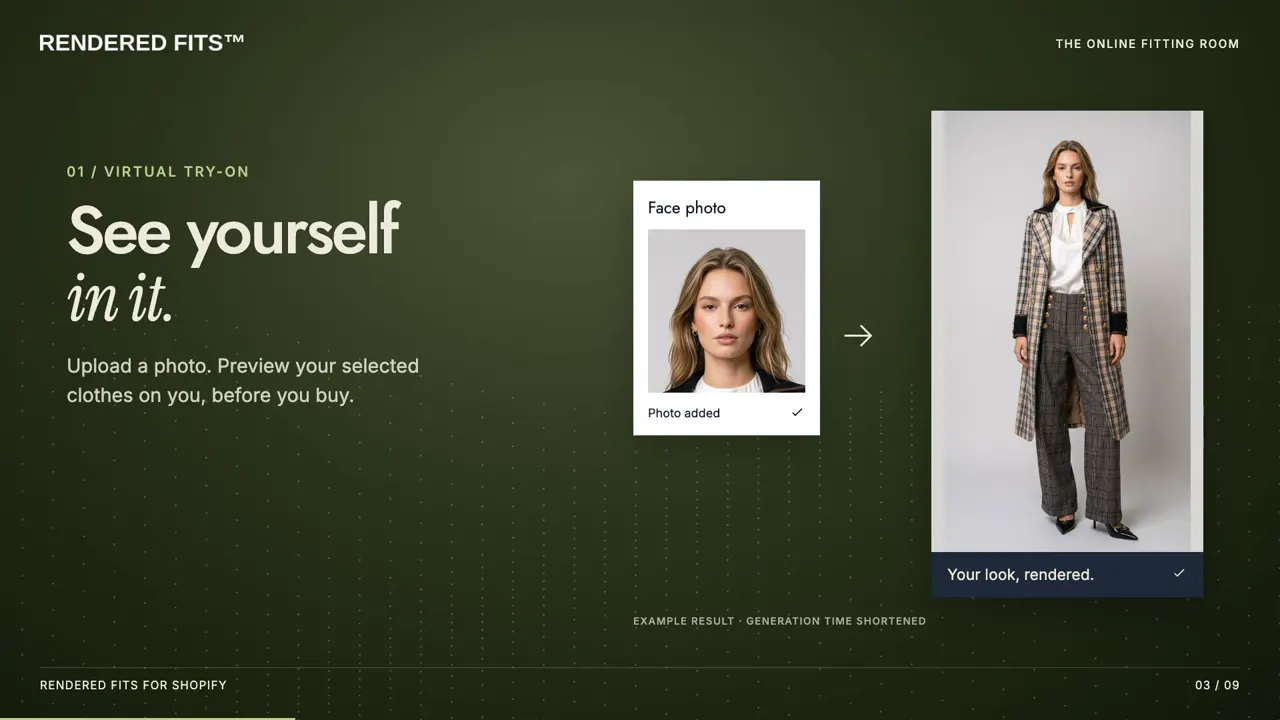
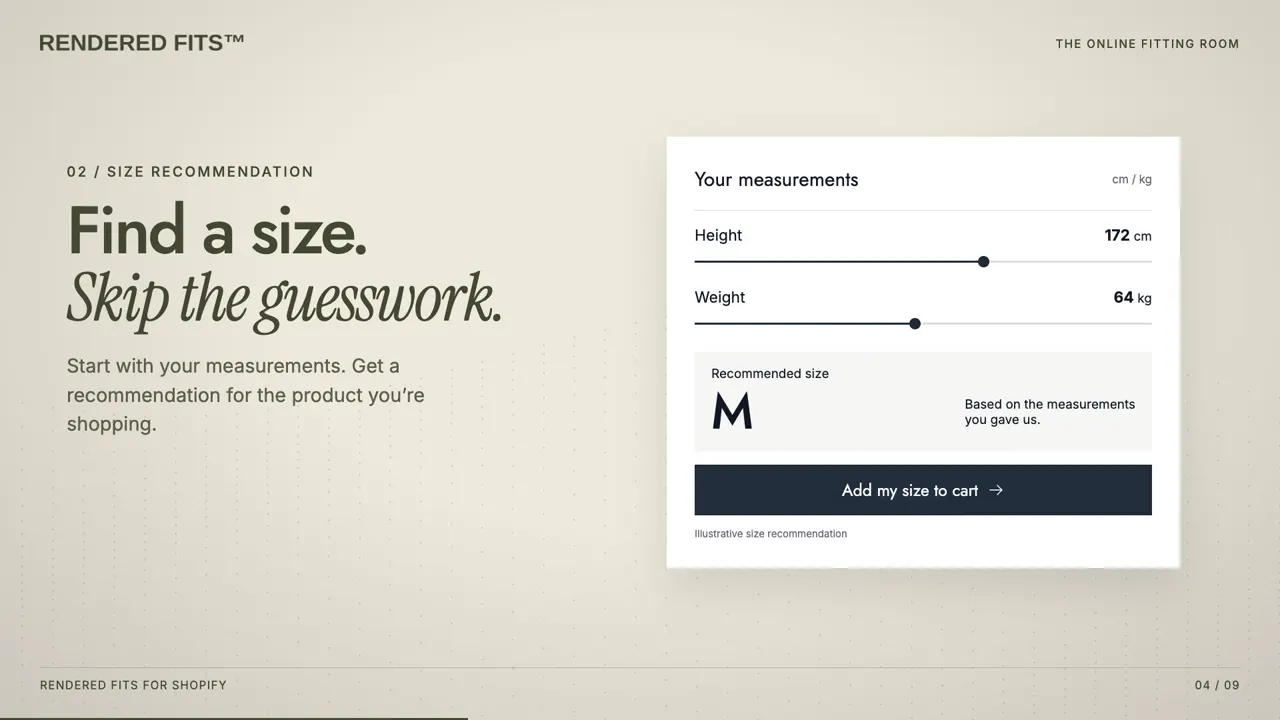
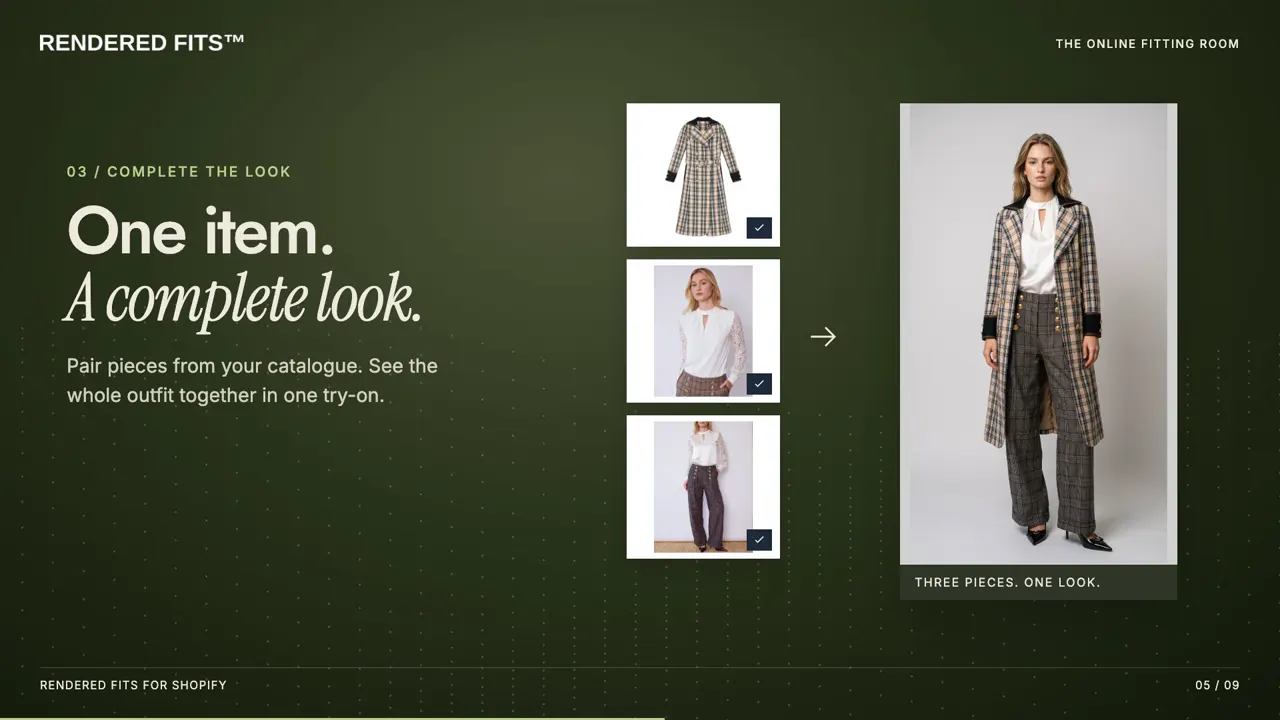
The preview shows how the garment might look. It is not a physical fit test, which is why the size recommendation matters as much as the image.
Three ways to add virtual try-on to Shopify
| Route | What it involves | Suits |
|---|---|---|
| Shopify App Store app | Install, place a theme app block, choose products. Monthly plan, no development work for standard themes. | Most fashion brands on Shopify |
| Custom or agency build | An agency integrates a try-on API or model into your theme. You own the build and its maintenance. | Brands with unusual themes or in-house developers |
| AR try-on | Live camera overlay, mostly for eyewear, jewellery, shoes and bags rather than full garments. | Accessories brands |
To compare apps on the first route, see our comparison of Shopify virtual try-on apps, which states what each listing offers and when it was checked.
Three parts of the buying decision
Visualise the garment
A shopper uploads a photo and sees an AI-generated preview using your product imagery. The result illustrates the look; it is not a physical fit test.
Choose a suggested size
Measurements and available product sizing information support a product-specific recommendation. Good size information matters, and fit is not guaranteed. Explore size recommendations for Shopify.
Build the outfit
Complete the Look suggests coordinating catalogue pieces that shoppers can combine in one try-on.
Set up virtual try-on on Shopify in five steps
- Install the app. Add Rendered Fits from the Shopify App Store and approve the plan in Shopify.
- Prepare a small product selection. Use clear photographs and check each product’s available sizes and size chart.
- Add it to your theme. In the app, open Set up your store and select Add to my store to place the theme app block, then save in the theme editor. Theme differences can require setup help.
- Test the shopper journey. Preview on mobile and desktop: photo input, size guidance, Complete the Look and adding the chosen size to cart.
- Show it to shoppers. Select Show to shoppers when you are happy. Nothing is visible to shoppers before this step.
Follow the Shopify virtual try-on setup guide. For custom themes or unusual product imagery, discuss your setup with the team before planning a rollout.
What virtual try-on for Shopify costs
| Plan | Price | Includes |
|---|---|---|
| Free | $0 a month | Personalised sizing on one selected product and 5 try-on images per monthly allowance period |
| Complete | $349 a month, 14-day trial | 1,000 try-ons per paid cycle, personalised sizing across your catalogue and Complete the Look; 50 images during the trial |
| Enterprise | $999 a month | 5,000 try-ons per paid cycle and everything in Complete, for larger catalogues and higher traffic; no trial |
How this compares with other apps: what virtual try-on costs on Shopify, app by app. If you also want size advice and outfits in the same place, see the virtual fitting room for Shopify.
USD, excluding applicable taxes; one Shopify storefront per plan. See current plans, allowances and trial terms.
What virtual try-on can't do
- It does not prove physical fit. A generated image shows appearance; fit depends on the size chosen.
- It depends on your product photos. Clear, well-lit images of the garment give better previews.
- It does not by itself show how many extra sales it caused. Purchases after try-on show association, not cause; measure it properly.
- Rendered Fits has not published a controlled merchant result for returns.
Questions before you install
What is a Shopify virtual try-on app?
A Shopify virtual try-on app lets shoppers preview how a garment might look on their own photo before buying. Rendered Fits combines this optional AI appearance preview with product-specific size recommendations and Complete the Look. A generated image is not a physical fit test.
How is this different from ChatGPT’s Try on button?
ChatGPT’s Try on button, launched on 1 October 2026, shows a generated preview inside ChatGPT before the shopper reaches your store, and OpenAI says it does not guarantee fit or size. Rendered Fits works on your own product pages: it gives a size for that exact product from your size chart and fit notes, with an optional try-on preview.
How do I add virtual try-on to a Shopify clothing store?
Install Rendered Fits from the Shopify App Store, open Set up your store, and select Add to my store to place the theme app block. Save in the theme editor, preview the shopper journey, then select Show to shoppers when it is ready. Prepare product photographs and usable size charts; test mobile and desktop before launch.
Is there a free virtual try-on app for Shopify?
Yes. Rendered Fits Free is $0 a month, with personalised sizing on one selected product and 5 try-on images per monthly allowance period. Complete is $349 a month after a 14-day trial with 50 images total. Enterprise is $999 a month with no trial. Paid plans cover one Shopify storefront; prices are in USD, excluding applicable taxes.
Can virtual try-on reduce returns caused by wrong sizing?
It may help shoppers evaluate a garment, but an appearance preview does not establish physical fit. Pair it with product-specific size recommendations, accurate size charts and clear fit notes. Measure mature size-related returns for comparable products or a controlled test; Rendered Fits has not published a controlled merchant return-reduction result.
See current plans, processing allowances and trial terms. Existing customers retain their agreed terms.
What ChatGPT’s new Try on button means for Shopify fashion brands
Measure usefulness, then commercial value
Start with whether shoppers use the experience and complete it successfully. Track product interest, cart activity and purchases after app use alongside your costs. Those purchases show association; they do not establish how many additional sales the app caused.
Decide in advance what a useful evaluation looks like for your store. Size-related return claims need delivery and return outcomes over a suitable period, not just an attractive try-on image.
Explore it for your Shopify store
See the current app listing or bring your theme and catalogue questions to the team.
Plan your evaluation
Understand size recommendations · Compare Shopify apps · Prepare your size information · Measure store outcomes
Evaluating a premium or luxury collection?
Use the luxury brand guide and catalogue evaluation scorecard to review your product imagery, size guidance and shopper journey.